
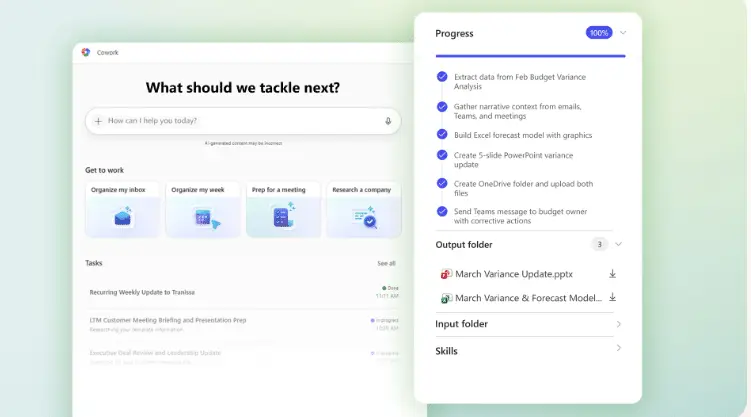
Microsoft Cowork Copilot: the AI that goes from helping you to working with you.
With the arrival of Cowork in Microsoft Copilot, artificial intelligence takes a step further: it stops being just a support tool and begins to execute real work, within the Microsoft 365 environment, always under the supervision of the user.
Microsoft 365 Copilot Cowork is characterized by working as an agent that is connected to the Microsoft 365 ecosystem, leveraging the permissions and context of each user. This allows you to interact naturally with the various applications and perform actions in an integrated manner.
This new approach aligns with solutions such as OpenClaw, an open source AI assistant aimed at executing real tasks on the system, or Claude Co-Work, which transfers this concept to the desktop environment by automating processes directly on the PC.
At Creativity Spark, we see Microsoft 365 Copilot Cowork as a strategic piece in the development of modern work: an AI that doesn’t replace people, but amplifies their capacity and productivity. Below, we explore how to harness its full potential.
What exactly is Microsoft Copilot Cowork?
Cowork is an advanced capability of Microsoft 365 Copilot, currently available in preview (Frontier), designed to perform complete tasks on behalf of the user within Microsoft 365.
The key difference compared to other attendees is clear:
- It doesn’t describe what you could do.
- It gets the job done.
From sending emails, scheduling meetings, or creating documents, to researching corporate information and generating reports, Cowork acts as a digital collaborator that integrates into your daily work.
From conversation to action: this is how Cowork works
The interaction model with Cowork is simple and developed in a controlled manner:
Describe the task in natural language
Example: “Send a meeting summary to the team and create a presentation with key points.”
- Cowork breaks the request into steps, plans, and executes each action sequentially.
- You can follow in real time what it is doing and how.
- Before you send emails, post messages, or schedule meetings, ask for explicit approval.
- Review and final adjustment, where you can download documents, review results, or ask for improvements.
What can Cowork do today within Microsoft 365?
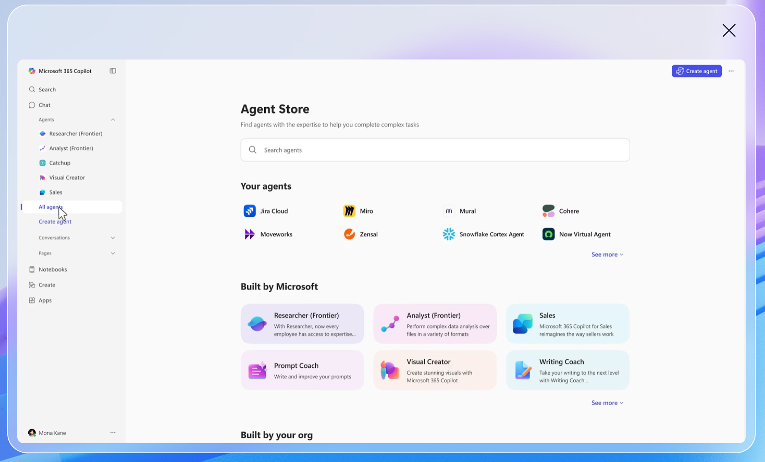
Cowork operates directly on top of the apps we already use on a daily basis. Among its most relevant capabilities are:
Communication and collaboration
- Compose, reply, and send emails from Outlook.
- Post messages to Microsoft Teams channels and chats.
- Create newsletters.
- Prepare clear and professional communications.
Documents and content
- Create documents in Word, Excel, PowerPoint, or PDF from scratch.
- Edit and enhance existing files shared in the conversation.
- Organize folders and files in OneDrive and SharePoint.
Calendar and meetings
- Schedule meetings using natural language.
- Manage scheduling conflicts.
- Prepare key information before important meetings.
Research and search
- Search for information across the organization.
- Conduct deep research and synthesize data into comprehensive reports.
Automation
- Execute tasks on a scheduled basis for recurring processes.
Overall, Cowork facilitates operations and frees up time for tasks of greater strategic value.
Functionalities and extensibility
One of the great differentials of Copilot Cowork is that it includes integrated functionalities for:
- Word, Excel, PowerPoint, and PDF
- Email and communications
- Calendar and meetings
- Extends with Microsoft 365 App Store Add-ons
- Can connect to external services and data sources
Some examples below:
General Examples
“After each meeting called ‘Goal Evaluation’, analyze the transcript, identify the tasks and assignees, create a summary table, and email it to me at 17:00.”
“Every Friday at 12:00, check the project folders in SharePoint, detect missing mandatory documents, and send me a notice with the details.”
“Create a new product launch plan, using the team’s most recent emails as a base and structuring it by objectives, phases, responsibilities, and next steps.”
Excel and Word examples
Excel Microsoft 365 Copilot Cowork example:
Automatic analysis of results and creation of an Excel-ready file for decision-making
A business manager needs to analyze monthly sales results, spot trends, and share insights with the management team. With Cowork, describe the need in natural language:
“Create an Excel spreadsheet with the sales data of the last month, analyze the evolution by region and product, and highlight the main conclusions.”
What does Cowork do in Excel?:
- Search for relevant data in the company, in all resources such as SharePoint, OneDrive, or other files in the organization.
- Create an Excel sheet from scratch with:
- Tables structured by region and product.
- Formulas for calculating variations and totals.
- Automatic summaries with the most relevant points.
- Submit the file for review before saving or sharing it.
Word Cowork example:
Automatically create a report in Word from multiple sources
A department head needs an executive report to management that consolidates scattered information: emails, previous documents, and data stored in SharePoint.
How does CoWork intervene?
The user describes the need:
“Create an executive report in Word with the current status of the project, using SharePoint documentation and the latest emails from the team.”
What does Cowork do in Word?
- Search for relevant information across your organization (documents, emails, and shares).
- Create a Word document from scratch, structured with:
- Introduction and context.
- Current status and main milestones.
- Risks, blockages, and next steps.
- Write content with a professional and clear tone, ready for direction.
- Submit the document for review before saving or sharing it.
Therefore, with Cowork, the user always remains in control. The AI executes, but the final decision remains with the person.
Why does Cowork mark a before and after?
Until now, AI in the professional environment has focused on helping people think better. Cowork introduces a new functionality: helping you run better.
This has a direct impact on:
- Reduction of repetitive tasks.
- Faster execution speed.
- Better focus on strategic decisions.
- Standardization of processes and communications.
At Creativity Spark, we believe this is the true potential of enterprise AI:
empowering people, not replacing them.
Do you want to start designing how your company will work with this AI?
At Creativity Spark, we help you connect Copilot Cowork with your real processes.
Contact us now.
Important note: Frontier Availability and Innovation
Cowork is currently available as a preview feature within Microsoft’s Frontier program. Like any preview, its functionalities are constantly adapting and will evolve.
Copilot Cowork: Now available in Frontier | Microsoft 365 Blog
Introducing the First Frontier Suite built on Intelligence + Trust – The Official Microsoft Blog