Digital time control: the challenge for many companies
Many organizations still manage employee timekeeping, timesheets, and project tracking using spreadsheets, emails, and manual processes.
This often becomes a problem when projects increase, headcount grows, and a more accurate view of costs and profitability is needed.
Implementing a time tracking solution in Microsoft 365 and Power Platform allows you to record hours worked, automate approvals, and gain real-time insights for better decision-making.
Is your company still managing timesheets with manual processes? Maybe it’s time to implement a digital time tracking solution integrated with Microsoft 365.
At Creativity Spark, we give you free access to our Spark Time app, a time tracking, timesheet management, and project tracking app developed on Microsoft Power Platform.

Common problems in manual management of hours worked
Companies that use Excel or manual processes for time tracking often face challenges such as:
- Lack of visibility into the actual hours spent on each project.
- Difficulty in calculating costs and profitability.
- Delays in approving work reports.
- Errors from scattered spreadsheets.
- Lack of traceability of the imputed hours.
- Little ability to analyze the productivity of the teams.
When HR managers need to know how much time has been spent on a project or analyze employee workload, collecting this information manually often takes a significant amount of time.
How to automate timekeeping with Microsoft 365 and Power Platform
Our solution, an app developed with Microsoft Power Platform, integrated into Microsoft 365, allows you to digitize time and project management.
Employees can easily record their hours worked, while managers have centralized information to monitor projects, control costs, and improve resource planning.
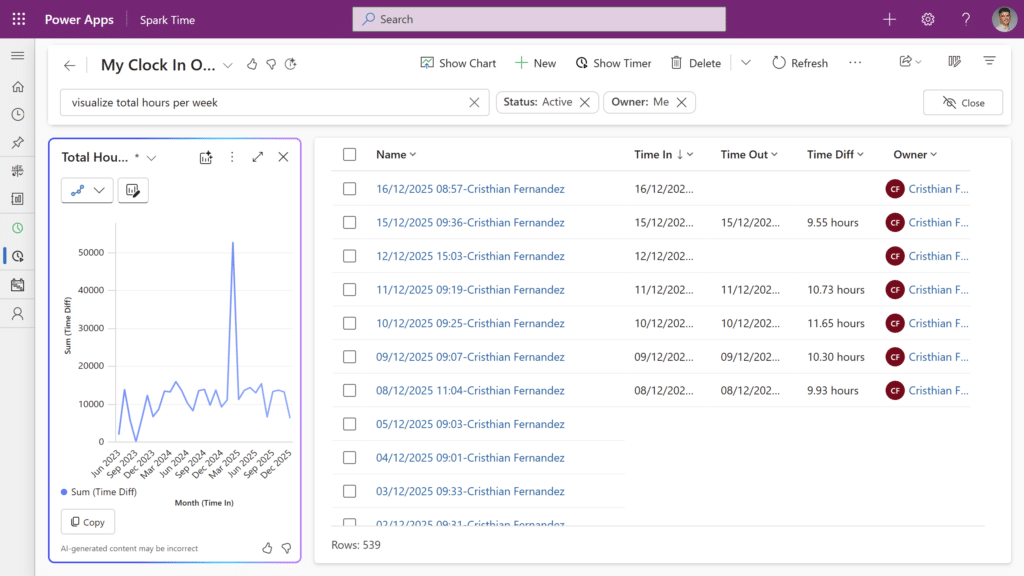
Time tracking by project and task
Company members can allocate hours to specific projects, clients, departments, or tasks, facilitating detailed tracking of the effort invested in each activity.
This functionality allows you to improve project management and obtain a real vision of the profitability of each initiative.
Weekly timesheet management
Users complete and submit their timesheets on a weekly basis from a single platform.
Before sending, they can make modifications and validate the information, guaranteeing greater accuracy in the records.
Automated approval flow
Using Power Automate, managers automatically receive requests to approve or reject work reports.
Push notifications streamline the process and eliminate the need to send follow-up emails.
Tracking and traceability statuses
Timesheets can be managed using different statuses:
- Draft
- Sent
- Pending approval
- Approved
- Rejected
In the event of rejection, the worker can make the necessary corrections and resend the record for further validation.
Dashboards and analytics with Power BI

One of the biggest advantages of digitizing time tracking is access to up-to-date information through dashboards or dashboards.
Managers can analyze:
- Hours per project.
- Hours per customer.
- Hours per employee.
- Hours per period.
- Workload distribution.
- Costs associated with projects.
- Profitability of teams and departments.
- Productivity trends.
Thanks to Power BI, this data can be visualized in real time to facilitate management based on objective indicators.
Data Export and Integration
The information can be easily exported and integrated with other business applications such as ERP, financial solutions, human resources, or project management tools.
Benefits of our free Spark Time Tracking App in Microsoft 365
Greater control of costs and profitability
By knowing precisely the hours spent on each activity, companies can calculate real costs, detect deviations, and improve the profitability of projects.
Increased administrative productivity
Automating processes using Power Platform significantly reduces manual tasks related to collecting, reviewing, and approving hours worked.
Data-driven decision-making
Managers have reliable, real-time information to balance workloads and plan.
Scalability and customization
Apps developed with Power Apps, Power Automate, and Power BI can adapt to each organization’s processes and evolve.
Why choose Spark Time in Power Platform for time tracking?
Companies that already use Microsoft 365 can make the most of their technology ecosystem by incorporating a digital time tracking solution, integrated with tools such as Teams, Outlook, SharePoint, or Power BI.
In addition, Power Platform allows you to connect time management with other business processes:
- Project management.
- Human resources.
- Document management.
- Financial control.
- Operational reports.
This makes it easy to create a unified and scalable digital environment.
Conclusion: Spark Time for time control
Digitizing the process of recording and approving hours allows you to reduce administrative tasks, increase visibility over projects, and improve team management.
And the best part is that we offer Spark Time for free to organizations that want to modernize their time management and eliminate reliance on Excel and manual processes.
How does your company currently manage time tracking?
- Still using spreadsheets?
- Do you find it difficult to know the actual hours invested in each project?
- Does the approval process consume too much administrative time?
Access our free SPARK TIME app from the Microsoft Spark Time Marketplace. If you want, send us a message, and we will show you how the solution works and how it can be adapted to your company.
Contact us now: Creativity Spark Bookings